
Made in Puerto Rico

Businesses / Servicesand places to explore

Fomkoo connects you with local businesses near you, and helps you discover beaches, waterfalls, lookouts and historic sites across the island — all from one app.

Now available on the App Store and Google Play.
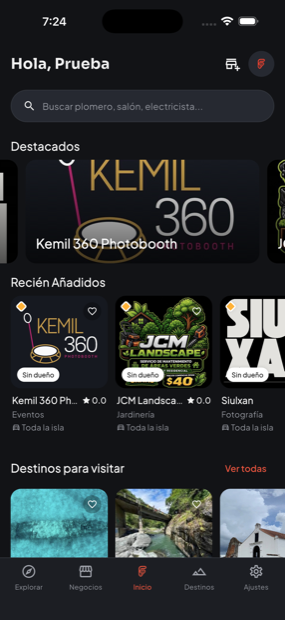
Near you 78 towns
Fomkoo home screen
A glimpse

Here's what itlooks like inside

What Fomkoo does

All of Puerto Rico,in one app

One place to find who can help you, and where to go this weekend.

Business directory

Search by category, town or distance. Call, message on WhatsApp, or chat with the business right in the app.

Interactive map

See businesses and destinations on a real map, filter what you need, and get directions in one tap.

Places to visit

Beaches, waterfalls, lookouts, historic sites and more — with photos, location and directions.

Real-time chat

Message businesses directly, without leaving the app.

Real reviews

Rate with stars and share your experience to help others decide.

Always current

Recently added, businesses near you, and alerts for what you care about.
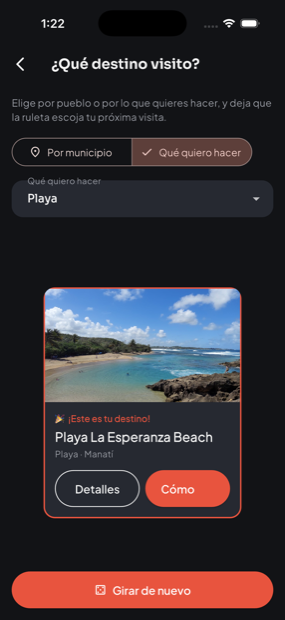
Destination wheel
Our favorite

Not sure what to do?Spin the wheel

Pick a town or the kind of place you feel like, and let Fomkoo surprise you with your next trip — beach, waterfall, historic site, whatever. That simple.

Collect the island

Stamp yourPassport

Every place you visit gets marked. Show up, open Fomkoo and stamp it — the app confirms you're there. 400+ places to discover, from Aguadilla to Vieques.

And Routes group them into challenges: west coast beaches, mountain waterfalls, Old San Juan. Complete them at your own pace.
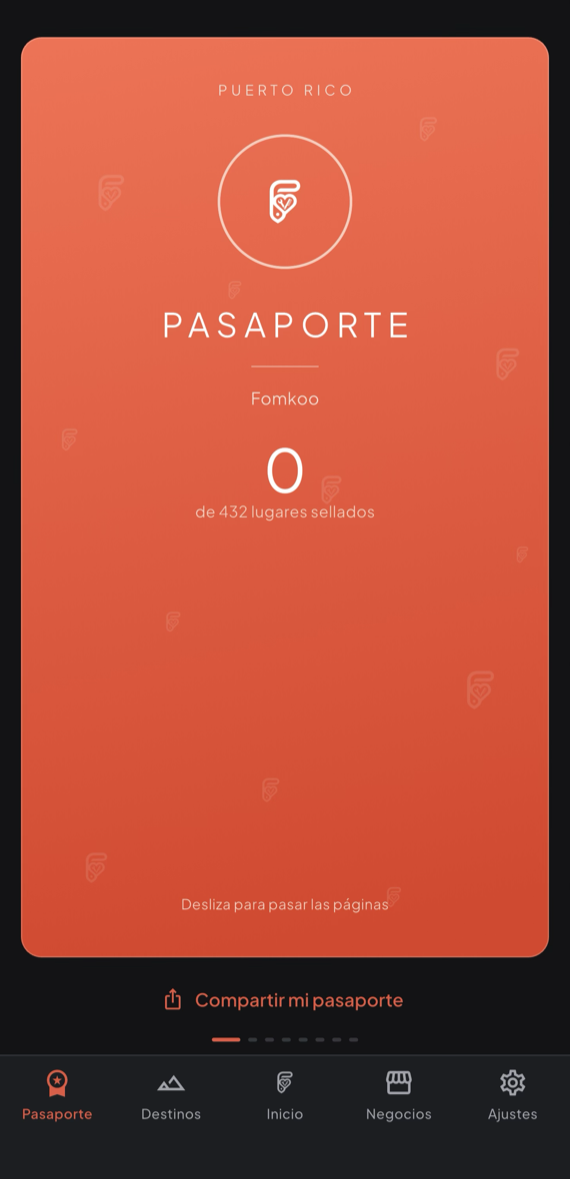
Fomkoo Passport with more than 400 places to stamp
Community program

FomkooScouts

Help build the directory: add destinations, suggest photos or correct information — free, and you earn points for every contribution an admin approves.

Scout Scout Pro Scout Elite Scout Legend Scout Founder
For business owners

Get foundwhen people search

  • List it free with photos, hours and services.
  • Show up by category, town or distance from the customer.
  • Upgrade for more photos, better placement and customer chat.
  • Stats on views, calls and messages.
FreeBasic listing, 3 photos
Basic8 photos, better placement, chat
Premium20 photos, video, featured category
SponsoredFirst in results, featured badge
Step by step

How to list your business on Fomkoo

Listing it is free and happens right in the app — it takes a few minutes. Here's how:

1

Download the app and create your account

Get it free for iPhone or Android (links at the bottom of this page) and sign up with your email.

2

Go to "Register my business"

You'll find it in your profile, or in the "Have a business or service?" banner on the Home screen.

3

Tell us about your business

Name, description, category (and subcategory if it applies). The clearer it is, the easier you are to find.

4

Tell us where you are

If you have a physical location, mark the town, address, and exact pin on the map. If not, tell us whether you serve the whole island or only certain towns.

5

Leave your contact info

Phone number (required) and WhatsApp if you want people to message you there. If you have Facebook, Instagram, or a website, you can add those too. You also choose whether to turn on live chat inside the app.

6

Upload your logo and photos

The logo is required — it's what identifies you on cards and listings. The free plan lets you add up to 3 more photos; paid plans allow more.

Free to start
7

Send it for review

A Fomkoo admin reviews it — usually quickly — and as soon as it's approved, your business shows up in the directory.

Frequently asked questions

Have questions?

Here's what businesses and Fomkoo users ask us most.

How much does it cost to list my business?
Nothing. The Free plan includes a basic listing and 3 photos. If you want more photos, better placement in results, or chat with customers, you can upgrade to a paid plan whenever you want — it's never required.
How long does approval take?
A Fomkoo admin reviews it by hand before it goes live, so the directory stays real and trustworthy. It's usually quick — in the meantime, your business stays pending and no one else can see it.
Can I list my business if I don't have a physical location?
Yes. When you register, you choose whether you have a location (with an address and pin on the map) or provide a service with no location of your own — from there you say whether you cover the whole island or just certain towns.
Can I edit my business info later?
Yes, anytime from "Business panel" inside the app. Some changes (like the logo of an already-approved business) go through a quick review again before going live, so no one else can change it without permission.
I see my business on Fomkoo but I didn't add it — what do I do?
A Fomkoo Scout may have added it. Open that business's page in the app and look for the option to claim it — an admin will confirm you're the real owner and transfer it to you.
Do I manage it from the app, or is there a web panel?
Everything is managed from the app — uploading photos, changing your logo, editing your info, viewing your stats. No computer needed.
What are Fomkoo Scouts and the invitation code?
Scouts are community members who help add businesses and destinations to Fomkoo. If a Scout invited you, you can enter their code when you register — it's optional and doesn't change the process, it just gives credit to whoever invited you.
How do I contact support if I have a problem?
Email us at soporte@fomkoo.com or reach us on our social media, linked at the bottom of this page.